Tampilkan postingan dengan label software. Tampilkan semua postingan

Autodesk Meshmixer 3 is out with some interesting and useful new features!

New features:

  • new Complex objects that contain internal partitions (beta!). Complexes make it easy to design for multi-material 3D printing!!
  • Generate Complex tool to create a Complex from face groups
  • Split Complex decomposes a Complex into separate solid shells
  • new Export mode that automatically decomposes Complex on write
  • new Align to Target tool to automatically align meshes in 3D
  • new Unwrap tool flattens surface patches
  • new SVG Export can export meshes as SVG (edges, colors, etc). Try it with Unwrap!
  • new Mesh Query tool for visualizing mesh properties
  • new measurement-based scene scaling workflow in Units/Dimensions tool
  • new Select Intersecting action in Select tool (double-click on other scene objects)
  • new Preserve Group Borders and Project To Target options in Smooth Boundary
  • Remesh can now automatically preserve sharp edges
  • Make Pattern can now clip to active Target object
  • Make Solid updates and new mode to automatically preserve sharp edges (slow!)
  • huge Booleans stability improvements
  • minor improvements to Transform, Smooth, Replace and Reduce
  • export support for SMESH format
  • Pivot-drag positioning shortcut can now terminate on any surface in scene
  • new unlit-texture shader
  • support for Autodesk Screencast
  • crazy bugfixes
  • tons of UI improvements to indicate disabled/unavailable menus and settings
  • lots of [scripting API improvements]

Video overview:


Go get it here:

http://www.meshmixer.com/download.html


Weird Bunny ... What happened to you bro? 


LaserWeb is powerful open source laser cutter and engraver control software. Perfect choice for your self-build laser cutter or upgrading a cheap Chinese Co2 laser device.

LaserWeb description and features:

Node.js based, Windows/Linux/Mac/Raspberry Pi/Vagrant supported, host software for Lasercutters/Engravers running Marlin/Smoothieware/Grbl/LasaurGrbl with integrated parametric Gcode generators, Raster support, as well as Raster and Vector Engraving. SVG and DXF supported for cutting, PNG, BMP, JPEG support for raster engraving.
It works on all platforms from Windows, OsX,  various linux distros and Raspberry Pi.

Here is a demo video:


GitHub repository:

https://github.com/openhardwarecoza/LaserWeb


Printocracy started as a quoting aggregator for 3D printing, uploading and quoting parts through iMaterialise, Shapeways, Scuplteo and other services. Soon they found out that there was a needs for small / mid-size service bureaus to quote parts for their own customers and drive traffic to their sites.

They developed an web based application that acts lik a backend CMS for your service bureau. After putting in some information about the 3D printers you have, the materials you offer and the finishes you provide, your customers can upload, repair and get quote for any model they want printed.

After building your shop on the backend through Printocracy manufacturer portal, you can drop one script tag onto your site and it will render a customizable quoting interface right on the page.

They have big plans to put in some quoting parameters that that take into account overhead costs, depreciation, error rates, support material, square footage, etc...

Currently it is in Beta and you can join in while it lasts, with 50 tester accounts for the closed Beta beginning in March. They will go live in next few months. 


Printocracy homepage:


Katana is a new slicer released by Printr (of Formide ecosystem) that claims many features. I still have to test it and make a review.


Katana homepage:

http://printr.com/katana

There are some reviews on this forum which are not so favorable:

https://ultimaker.com/en/community/18617-katana-slicer-by-printr


Disney Research developed the software to automatically designs 3d printable connectors. It looks amazing if it really works as described.

Where will this invention go? What will happen to it? It will probably end up in some corporations intellectual property portfolio.


From project description:

We present AutoConnect, an automatic method that creates customized, 3D-printable connectors attaching two physical objects together. Users simply position and orient virtual models of the two objects that they want to connect and indicate some auxiliary information such as weight and dimensions. Then, AutoConnect creates several alternative designs that users can choose from for 3D printing. The design of the connector is created by combining two holders, one for each object. We categorize the holders into two types. The first type holds standard objects such as pipes and planes. We utilize a database of parameterized mechanical holders and optimize the holder shape based on the grip strength and material consumption. The second type holds free-form objects. These are procedurally generated shell-gripper designs created based on geometric analysis of the object. We illustrate the use of our method by demonstrating many examples of connectors and practical use cases.
Project homepage:

http://www.disneyresearch.com/publication/autoconnect/


Rich Olson has another great tutorial on how to design and make chainrings using open source software and low cost CNC.


Here is the link to original post with all the tools and scripts needed:

http://www.nothinglabs.com/chainringgen-making-a-chainring-with-open-source-software/


Rich makes a chainring for his bicycle but they have different uses in power transmission. Beside metal they can be also made on a small CNC from other materials like carbon fiber.


Finished carbon plate chainring for a custom bicycle:


Become Marlin expert with excellent tutorials by Thomas Sanladerer. Thomas is well known 3d printing vlogger and his channel is well worth following. It has some great content including testing, guides, how to-s and  reviews.

Here is part 1 with introduction and basic concepts such as installing, hardware and firmware:


Here is part 2 where you will become power user and Marlin guru, it covers:
  • Power-user tips
  • Advanced options in Configuration.h
  • Even more advanced things in Configuration_adv.h
  • Bending the electronics to your will with pins.h
  • Using custom temperature sensors with thermistortables.h


great work, thank you Thomas!


Microsoft is getting stronger into 3d printing with this new integration of Kinect for Windows as 3d scanner into their 3D Builder Windows application.

In their promotional video they are showing Kinect being use as a sort of family oriented imaging device, a kind of 3d camera. I would like to see it being used to 3d scan some sort of small mechanical part, since this function more suits my hobby needs. Hopefully we will see more DIY oriented reviews or tests in the future.

Kinect for Windows has developer SDK platform available for independent developers so 3d scanning and input into more 3d printing or CAD software could be available in the future.


You can manipulate 3d scanned object in 3D Builder by touch controls on Microsoft surface tablet 


Kinect for Windows home page:

http://www.microsoft.com/en-us/kinectforwindows/default.aspx

And this is probably just a beginning ... 3d scanning could be integrated in all tablets and smartphones in future ...


"Jake" and "hzeller" developed a project where KiCAD (open source electronics board development software) files are converted into g code to enable solder past dispensing with a DIY 3d printer on electronic boards.

They hacked a Type A machines printer into home manufacturing solder paste dispenser. The dispenser uses solder paste (aka. solder cream) applied trough syringe with air pressure. The team behind the project still has not released hardware specifications and details.

This project is interesting since it could enable anyone to make low cost desktop home manufacturing station and produce series of electronics boards.

The syringe dispenser pressure unit can be done at home workshop, here is a different project for reference:

https://www.sparkyswidgets.com/portfolio-item/diy-solder-paste-dispenser/

Solder paste is heated after dispensing on electronics board surface to melt and fuse the conection closing the electric circuit.


Here is the original code for solder paste dispensing that converts KiCAD files to g-code:

https://github.com/hzeller/rpt2paste

the project is further developed to include pick-and-place capabilities:

https://github.com/hzeller/rpt2pnp

Now you can start your own small desktop electronics factory :-)


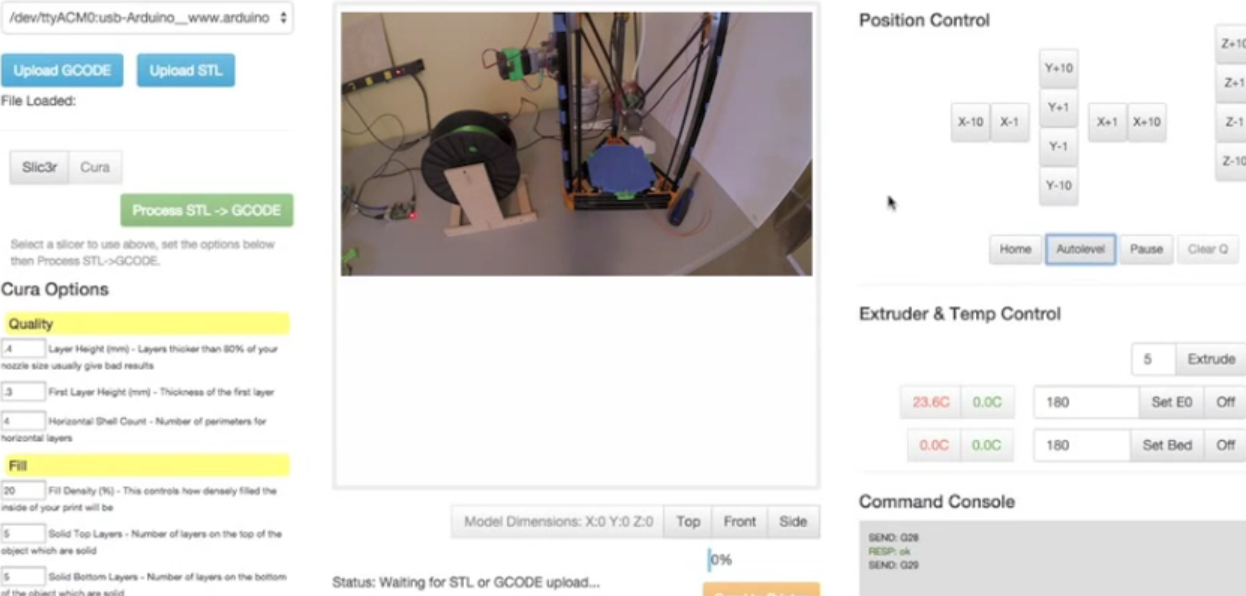
RepRapWeb is a fully functional open source 3d printer controller software UI which runs over http web protocol on Raspberry Pi.  It is developed by Andrew Hodel. It has some interesting features.
RepRapWeb features:
  • Free - Licensed under the Affero General Public License (AGPL)
  • Includes Slicing Software - Convert STL -> GCODE all within the same interface using CuraEngine or Slic3r
  • Nothing to install on your computer - Runs completely on Raspberry Pi, use any computer from anywhere to control it
  • Wireless Networking - Ethernet and 802.11 Wireless Connectivity for your printer
  • STL Visualizer - View your prints before you print them
  • Multi Printer Support - Control as many printers as you have USB ports all within the same interface
  • Complete Printer Control - Pause and unpause your prints in realtime, set and view temperatures and control movements
  • Auto Level Support - Includes support for printers which support Autolevel.
  • Fast - Quick and responsive interface, almost immediate slicing with CuraEngine

http://xyzbots.com/reprapweb.html

GitHub repository: https://github.com/andrewhodel/reprapweb


As a part of pre-release promotion and testing the people behind 3DPrinterOS enable everyone to use 3d printer of one of the team members via their software web interface.

From their release:
Prior to the full release of 3DPrinterOS, you can sign up and test out our software.

For those without 3D Printers who want to try 3D Printing, Aaron from our team made this walkthrough for requesting access to his 3D Printer (Makerbot Replicator 2) he has in Brooklyn, NY.
We will be posting some of these prints on our site and our twitter (@3DPrinterOS).
Relevant links:
To sign up: https://cloud.3dprinteros.com/To download current software: http://3dprinteros.com/To request Aaron's printer: aaron (at) secured3d.com

I'm not sure how long will this action last, but I'm sure that 3DPrinterOS will have success in the future.


FlatFab is a new CAD software that lets you intuitively design with two dimensional surfaces which you can then combine in 3d objects. It looks ideal for designing furniture or objects for CNC cutting.

I'm really getting interested in CNC cutting and milling since you can make larger functional objects like furniture from cheap materials like plywood.

Here is a simple FlatFab tutorial:


FlatFab homepage where you can download the software: http://flatfab.com/ 

There is no information on price or open source availability. It looks like it is in early stages of development so new features and improvements can be expected. It is available for Windows, Mac and Linux.

Update:

Here is a response from FlatFab team member:

"hi, flatfab is not open source at the moment, but it is FREE, and we intend to keep it that way. we also plan to grow with our user community so try it out and keep your feature requests coming."


Nice job FlatFab!


FlatFab user interface

Small pencil holder made with FlatFab

Update:

here is flatfab UIST 2014 presentation "Interactive modeling with planar sections":


I want to learn how to use Blender more for my 3d printing modeling  needs. Here is collection of tutorial videos I found you may find also useful.


Here is simple Blender 3d design for 3d printing tutorial by Jim Craig:


Here is one slightly more complex and detailed made by EcTechTime:


Tutorial by Benjamin Morgan on basic model and Blender setup preparing it for 3d printing:


Here is the entire playlist with many detailed Bender tutorial videos if you want to get into it deeper created by Jason Welsh:


Here is a detailed tutorial by i.materialise about preparing and checking 3d models for 3d printing:


Enjoy learning!


Researchers from Hasso Plattner Institute and Cornell University developed WirePrint software for faster prototyping. It basically custs down the time needed to 3d print an object by replacing solid volumes with wire frames.

A question comes to my mind: if this is publicly funded institute will the release the code under one of open source license? Public money should provide public with some tangible goods and services ...
I don't know much about how this sort of institution operates, gets funding and disseminates knowledge form applied research ...

Update: here is some sort of similar code on GitHub, inspired but not related to this project but creates wire frames:

https://github.com/ramkam/wireframe_3d


From video description:
WirePrint is a low-fi fabrication technique that prints 3D models as wireframe previews. By extruding filament directly into 3D space instead of printing layer-wise, we achieve a speed-up of up to 10x compared to traditional 3D printing.
This project is a collaboration between Hasso Plattner Institute and Cornell University.
More Information:
https://www.hpi.uni-potsdam.de/baudis...
WirePrint is a research project by:
Stefanie Mueller, http://www.stefaniemueller.org
Sangha Im,
Serafima Gurevich,
Alexander Teibrich,
Lisa Pfisterer,
François Guimbretière, http://www.cs.cornell.edu/~francois/
Patrick Baudisch, http://www.patrickbaudisch.com

This institute had a previous faBrickation project that uses Lego blocks for volume replacement in rapid prototyping:

http://diy3dprinting.blogspot.com/2014/02/fabrickation-3d-printing-with-volume.html


Here is new version of PreForm software from FormLabs. Here are the main new features:
  • Move pre-print workflow to status area and add links to print preparation support articles
  • Arrow keys rotate camera, and move/scale/translate models when appropriate tool is active
  • Faster print times for delicate models
  • Improved surface finish
  • Speed improvement opening files
  • Up to 50% faster auto orientation
  • In Support Edit Mode models are now colored blue
  • Show option to merge form files when dropped on icon in OS X
  • Default to the Form 1+ time estimate if no printer has been plugged in
  • Properly render quick release tabs after support edits
  • Fix issue where PreForm would crash on some Windows computers
  • Fix issue where model could disappear after editing supports


... if they ever release them to public. Now they are just papers, calculations and presentations with no public code.

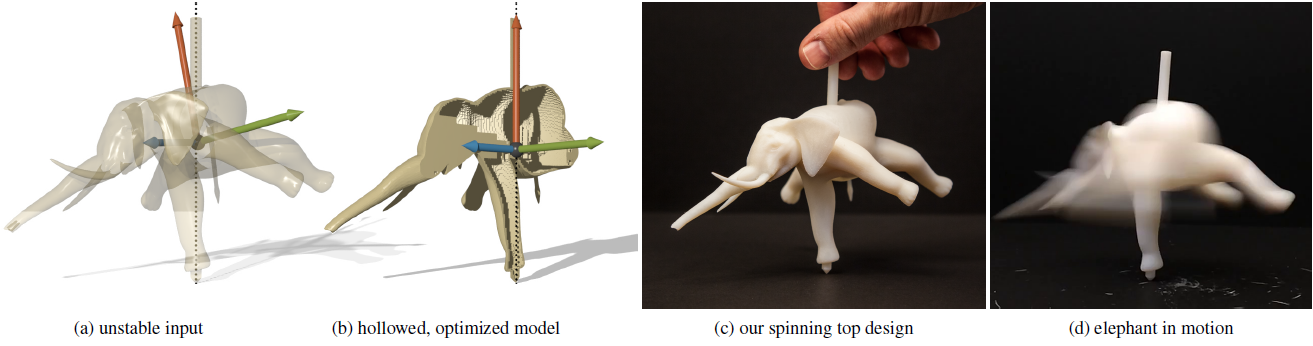
Disney presented two new technologies related to 3d printing. First one is more accurate hair 3d capture and reproduction and second is optimization of the models internal mass so they can be spun perfectly on one axis.

Now the 3d scanning and 3d printing of human figures in Disney will be more detailed for hair:


Disney research page:
http://www.disneyresearch.com/project/stylized-hair-capture/


3d models can be optimized so that the moment of inertia is balanced in 3d printed objects:


Disney research page:
http://www.disneyresearch.com/project/spin-it/


The final version of Repetier Host 1.0.0 for Windows is just released. The windows installer comes already with everything you need. It includes Slic3r, Skeinforge, Python and Pypy. 
Requires .NET 4 framework.

http://www.repetier.com/download/


You can store Marlin setting directly in EEPROM memory. On each boot, Marlin will automatically load these settings from EEPROM, independent of what your compiled Configuration.h says.

The Marlin EEPROM settings include the following:
  • Steps per mm
  • Maximum feedrates [mm/s]
  • Maximum Acceleration [mm/s2]
  • Acceleration
  • Retract Acceleration
  • PID settings
  • Homing Offset
  • Minimum feedrate [mm/s]
  • Minimum travel feedrate [mm/s]
  • Minimum segement time [ms]
  • Maximum X-Y jerk [mm/s]
  • Maximum Z jerk [mm/s]
Another excellent tutorial by ZennmasterM! He is producing some high quality video tutorials in field of 3d printing.

Here is also an additional post from Solidoodle wiki about Marlin EEPROM functions: 


3DPrintTech is a free software from India that will enable you to print objects larger than your printvolume by splitting them into smaller modules.

From the homepage:
3DPrintTech is CAD plugin for model splitting and nesting for efficient batch printing. It helps the user to print objects larger than build volume of a 3D printer. App splits the large model in small components as per your printer settings. It also creates the connectors to help you glue the components to make your original large model. User can define various parameters of splitting.
User has an option to scale the model. Also to get separated view of split parts can use Explode.
3DPrintTech has unique feature 3D Nesting. 3D Nesting helps you combine many small components in one single printing process by 3D packing with clearance. This helps you to save time, energy and money.

3DPrintTech also provides the option of Export to save the split parts or nested parts as stl files which can be directly use for printing.
Also user can do all these processes for his/her own customized printer too by adding it to the existing list of printers.
As 3DPrintTech is developed by using Confluence Framework, it supports:
  • AutoCAD 2014
  • Inventor 2014
  • Solidworks 2013
In future versions of 3DPrintTech using Confluence Framework, it will support more CAD softwares like Revit, Rhino, Creo, NX etc.
From the press release:
Pune, India - July 25, 2014 – Centre for Computational Technologies Pvt. Ltd. (CCTech), a CAD and CAM product development company, announced today launch of new application 3DPrintTech for maker community. 3DPrintTech helps maker to build object larger than build volume of any 3D printer. App also provides the functionality to pack small objects in given build volume which help to save time and money to user. 3DPrintTech is currently available for FREE of cost and works as CAD plugin with Autodesk Inventor 2014, AutoCAD 2014 and SolidWorks 2013.
3DPrintTech is designed for maker community who faces challenge to print larger objects on small 3D printer quickly. Processes of converting your design into small parts are time consuming and require good CAD modelling expertise. We realized there has to be a better way for this particular problem. Our R&D team came up with an application that can divide design of large object into small connectable components within few minutes. App also provides user option to control the cylindrical connectors as per his requirement. User can define the connector in terms of radius, length and taper angle. User also control the distance between the connectors, distance between connector and object surface.
Next problem of maker community is packing of multiple components in one print batch. One option for maker is to manually pack as many possible objects within build volume. He has to make sure that packed objects does not intersect or touch each other. To solve this problem, we provide a feature called 3D Packing. It creates the batch of 3DPrintings from collection of many small components. In our benchmarking, we found that for many cases our 3D Packing helped to reduce the 3D Printing batches from 10 to 1. This is definitely going to help makers to print more objects in less time and less money.
3D printing is continuously evolving technology. Therefore app has provided an interface to add your custom printer. App provides many utility functions such as Exporting processed objects to 3D printable STL file, Explode objects for quick inspection, scaling the object for unit conversion or fitting into printer. As 3DPrintTech works within a CAD system so you can do multiple design iterations without leaving the CAD application. All the 3DPrintTech operations are nondestructive and hence keep your design intact.
Sandip Jadhav, (Co-Founder & CEO, CCTech) says “3DPrintTech should help maker to improve productivity by great degree. It will also help maker to push envelope by making new large 3d objects. 3DPrintTech 1.0 was released on Autodesk App exchange in Autodesk University 2013. 3DPrintTech app received the great response and feedback. Out development team incorporated these user suggestions in our final product. App’s ability to create objects larger than the print volume using our automated splitting technique and packing of small components by efficiently nesting is key strength. 3DPrintTech is developed using CAD application development framework known as Confluence Framework. Therefore it works for multiple CAD systems seamlessly. In future we would provide more choices of connectors, packing types and more CAD platforms".
You can download 3DPrintTech software from http://labs.cctech.co.in/3dprinttech. To know more about the 3DPrintTech software & capabilities kindly contact labs@cctech.co.in.

http://labs.cctech.co.in/3dprinttech/


Slic3r stable version 1.1.6 is out. Since last time I looked at it it now has many new options like linear gap fill, per-region settings, modifier meshes, pillars / bridge support material, model cutting etc.

Here is a review by James Bruton (known for his 3d printed costumes such as 3d printed Xenomorph). He
explains functions like improved multi-material print handling and others.


http://slic3r.org/releases/1.1.6


Donate

Categories

diy VRAY VISOPT new diy 3d printer SKETCHUP MODELS HOUSES - VILLAS how to SKETCHUP MODEL LIVING ROOM low cost software open source arduino electronics instructables cnc SKETCHUP MODEL BEDROOM 3d printed robot europe guide VRAY PROXY kickstarter SHOP fff tutorial SKETCHUP MODEL DINING ROOM SKETCHUP MODELS CHAIR & EASY CHAIR education 3d printed toys fun hack resin robot sound space 3d printed weapons CHALLENGE SKETCHUP MODEL KITCHEN art home manufacturing large printer music open source 3d printer pop culture reprap ultimaker wearable 3d model 3d printed buildings 3d printing materials SKECHUP MODELS TABLE SKETCHUP MODEL BATHROOM delta 3d printer humor tips 3d printed music instrument 3d printing filament 3d systems VRAY TUTORIAL BASIC car cnc mill comic design eyewear heated build platform multi color multitool nylon paper print bed sla stratasys upgrade 3d printing in cement 3d scanner Switzerland adafruit australia cad controller cool things to 3d print extruder germany indiegogo large models medical applications of 3d printing mold repair review syringe video 2016 CES HDRI NASA OpenSCAD SKETCHUP MODELS FURNISHING ACCESSORIES SKETCHUP MODELS OFFICE FURNITURE TEXTURE aircraft android concrete dlp drone family filament extruder food formlabs furniture game google glass house household items hybrid i3 india keyboard laser optics pellet prosthetic prototype prusa raspberry pi science sls stereolithography tool uv 3d printing waste water web app 3d printer crime 3d printing on battery power BACKGROUNDS Future NEWSLETTER VISMAT VRAY SKETCHUP aluminum animal app aquaponics bluetooth camera casting ceramic clay desktop production disney diy science ecology energy generation engraver eye glasses fantasy figure hydroponics italy jet engine mcor metal 3d printing ninjaflex pcb milling pet pets pick and place plant plastic welding plywood polishing problemsolving rail recycling replacement part satellite school sf smoothing speakers sweden test 2014 3d printed airplane 3d printed car part 3d printed food 3d printed gun 3d printed uav 3d printer review 4d printing 5 axis Autodesk CUT OUT PEOPLE MIT Marlin Netherlands PS TUTORIAL SKETCHUP 3D MODEL VEGETATION Spain UK USA abs archery asia automation bed leveling bicycle biohacking bottle calibration chocolate composite control unit copyright creative commons dc motor digital fabrication disabled dremel enclosure fdm filament fire foldable form 1 garden ge history hype industrial injection molding insects jewelry laser cutter laser cutting law lens linux mach3 metal casting military modular multi materials open source hardware outdoor pen play-doh polyurethane problem repstrap router sand scara seemecnc selective laser sintering servo shapeways slicer solder speed support material thingiverse toy tv ultrasonic v-slot visualization weapon web web interface welding wifi windows wireless 3d printing wood wood frame 3d printer 2d to 3d 3d copy 3d drawing pen 3d print platform 3d print quality 3d printed sensors 3d printed vehicles 3d printer desk 3d printer stand 3d printer table 3d printing 3d printing wood 3d printshow 3d startup 6 axis Czech Republic ESA France GRAPHIC DESIGN ELEMENTS Intel Galileo Korea MDF Objet PETG Printrbot SKETCHUP 3D LIQUID SKETCHUP MODEL BABY - GUYS FURNITURE SKETCHUP MODEL LOFT & APARTMENT SKETCHUP TUTORIAL Shapeoko Singapore Slovenia TED VR VRAY TUTORIAL EXTERIOR VRAY TUTORIAL INTERIOR abs juice acetone acrylic africa air airwolf3d all-in-one apple armour arrow automotive batteries bedroom bioprinter blacksmith blender blind bronze brook drumm business buying home cardboard ccc cell cerberus children china closed loop cloud cody wilson community company tour cooling cosplay cubesat customized daily use data delta demonstration denmark drill dual extruder e3d economy environment etching fashion filabot filaflex firmware flexible ford friction welding fumes gartner gears general glass glue google graphene harvard hdpe heat chamber hungary ikea industrial 3d printer intellectual property ip rights japan k8200 kai parthy kinect laser sintering lcd led lego leveling library linear actuator liquid london lost pla casting lulzbot magnets make makerfarm prusa making money with 3d printing manufacturing map market metal filament metal hot end mexico microscope microsoft mix mobile 3d print control mobile factory model quality modification molecule moon nanoparticles nature news nfc ordsolutions parametric paste patent pcb photography plasma cutter plotter poland polyjet portable 3d printer portugal powder 3d printing presentation printhead process prosumer pump pvc pipes quadcopter reddit repetier replicator reprappro retro rings robo 3d rocket rostock max rubber rubber band russia sea security self assembly setup sharing slic3r smartphone solar south africa spaceX star trek steel stepper students surface tablet taiwan ted talks temperature testing textile titanium type a machines uav ultimaker 2 university usb user interface velleman virus wanhao wasp wasp 3d printer watch wind generator wire workspace xyzprinting

Donate

Popular Posts

Labels

diy VRAY VISOPT new diy 3d printer SKETCHUP MODELS HOUSES - VILLAS how to SKETCHUP MODEL LIVING ROOM low cost software open source arduino electronics instructables cnc SKETCHUP MODEL BEDROOM 3d printed robot europe guide VRAY PROXY kickstarter SHOP fff tutorial SKETCHUP MODEL DINING ROOM SKETCHUP MODELS CHAIR & EASY CHAIR education 3d printed toys fun hack resin robot sound space 3d printed weapons CHALLENGE SKETCHUP MODEL KITCHEN art home manufacturing large printer music open source 3d printer pop culture reprap ultimaker wearable 3d model 3d printed buildings 3d printing materials SKECHUP MODELS TABLE SKETCHUP MODEL BATHROOM delta 3d printer humor tips 3d printed music instrument 3d printing filament 3d systems VRAY TUTORIAL BASIC car cnc mill comic design eyewear heated build platform multi color multitool nylon paper print bed sla stratasys upgrade 3d printing in cement 3d scanner Switzerland adafruit australia cad controller cool things to 3d print extruder germany indiegogo large models medical applications of 3d printing mold repair review syringe video 2016 CES HDRI NASA OpenSCAD SKETCHUP MODELS FURNISHING ACCESSORIES SKETCHUP MODELS OFFICE FURNITURE TEXTURE aircraft android concrete dlp drone family filament extruder food formlabs furniture game google glass house household items hybrid i3 india keyboard laser optics pellet prosthetic prototype prusa raspberry pi science sls stereolithography tool uv 3d printing waste water web app 3d printer crime 3d printing on battery power BACKGROUNDS Future NEWSLETTER VISMAT VRAY SKETCHUP aluminum animal app aquaponics bluetooth camera casting ceramic clay desktop production disney diy science ecology energy generation engraver eye glasses fantasy figure hydroponics italy jet engine mcor metal 3d printing ninjaflex pcb milling pet pets pick and place plant plastic welding plywood polishing problemsolving rail recycling replacement part satellite school sf smoothing speakers sweden test 2014 3d printed airplane 3d printed car part 3d printed food 3d printed gun 3d printed uav 3d printer review 4d printing 5 axis Autodesk CUT OUT PEOPLE MIT Marlin Netherlands PS TUTORIAL SKETCHUP 3D MODEL VEGETATION Spain UK USA abs archery asia automation bed leveling bicycle biohacking bottle calibration chocolate composite control unit copyright creative commons dc motor digital fabrication disabled dremel enclosure fdm filament fire foldable form 1 garden ge history hype industrial injection molding insects jewelry laser cutter laser cutting law lens linux mach3 metal casting military modular multi materials open source hardware outdoor pen play-doh polyurethane problem repstrap router sand scara seemecnc selective laser sintering servo shapeways slicer solder speed support material thingiverse toy tv ultrasonic v-slot visualization weapon web web interface welding wifi windows wireless 3d printing wood wood frame 3d printer 2d to 3d 3d copy 3d drawing pen 3d print platform 3d print quality 3d printed sensors 3d printed vehicles 3d printer desk 3d printer stand 3d printer table 3d printing 3d printing wood 3d printshow 3d startup 6 axis Czech Republic ESA France GRAPHIC DESIGN ELEMENTS Intel Galileo Korea MDF Objet PETG Printrbot SKETCHUP 3D LIQUID SKETCHUP MODEL BABY - GUYS FURNITURE SKETCHUP MODEL LOFT & APARTMENT SKETCHUP TUTORIAL Shapeoko Singapore Slovenia TED VR VRAY TUTORIAL EXTERIOR VRAY TUTORIAL INTERIOR abs juice acetone acrylic africa air airwolf3d all-in-one apple armour arrow automotive batteries bedroom bioprinter blacksmith blender blind bronze brook drumm business buying home cardboard ccc cell cerberus children china closed loop cloud cody wilson community company tour cooling cosplay cubesat customized daily use data delta demonstration denmark drill dual extruder e3d economy environment etching fashion filabot filaflex firmware flexible ford friction welding fumes gartner gears general glass glue google graphene harvard hdpe heat chamber hungary ikea industrial 3d printer intellectual property ip rights japan k8200 kai parthy kinect laser sintering lcd led lego leveling library linear actuator liquid london lost pla casting lulzbot magnets make makerfarm prusa making money with 3d printing manufacturing map market metal filament metal hot end mexico microscope microsoft mix mobile 3d print control mobile factory model quality modification molecule moon nanoparticles nature news nfc ordsolutions parametric paste patent pcb photography plasma cutter plotter poland polyjet portable 3d printer portugal powder 3d printing presentation printhead process prosumer pump pvc pipes quadcopter reddit repetier replicator reprappro retro rings robo 3d rocket rostock max rubber rubber band russia sea security self assembly setup sharing slic3r smartphone solar south africa spaceX star trek steel stepper students surface tablet taiwan ted talks temperature testing textile titanium type a machines uav ultimaker 2 university usb user interface velleman virus wanhao wasp wasp 3d printer watch wind generator wire workspace xyzprinting